Align content vs Align items in Flexbox (examples)
Use align-content or align-items for centering with Flexbox?

You need to master both Flexbox and CSS Grid in order to professionally build modern websites & web apps. If you haven't mastered both of them yet, I highly recommend going through my CSS Course.
Usually, to center flex items vertically we can use align-items:
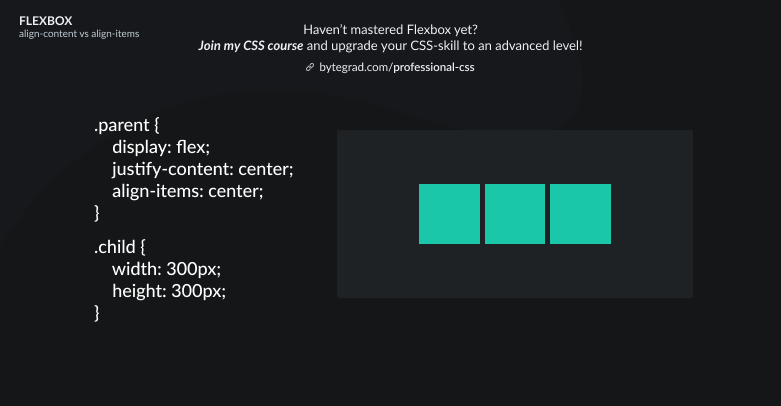
(I'm also using justify-content here to center the flex-items horizontally)
But what if we have more flex-items or flex-items that are much bigger so that they wrap onto a new line?
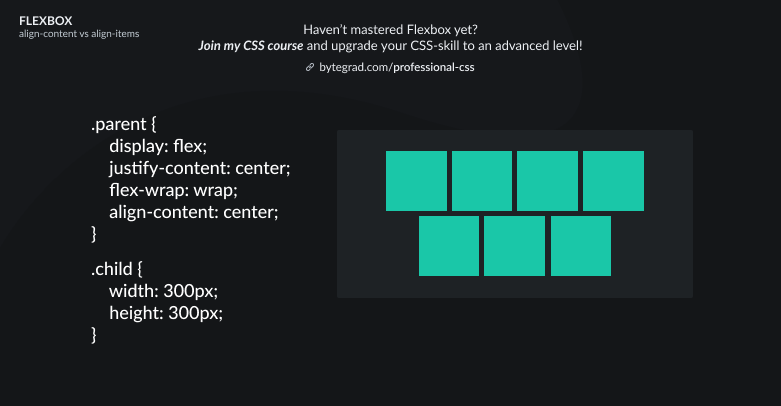
If you still use align-items then it will look weird. Now we actually need to use align-content.
By the way, if you change the flex-direction to column, the align-items and align-content properties will now center horizontally instead of vertically. And the justify-content property will now center vertically (so they 'flip').
Conclusion: use align-items if you have just 1 row or 1 column of flex-items. Use align-content if you have multiple rows or columns after flex-items wrap onto new lines.
By the way, I think CSS is the 'bottleneck' to most websites & web apps. I believe it's the highest-ROI skill you can master.
Before I mastered CSS, I lost a ton of time & energy fiddling around with CSS.
I was learning about advanced JavaScript topics when I couldn't even implement basic layouts in CSS...
So I created a CSS course to help you avoid the same mistake. Check it out here if you're interested.
Would you like to be notified when I release a new course? You'll get early bird discounts. Sign up for my newsletter here.
Also, I show projects of upcoming courses on social media, follow me here:
Comments
Join the discussionNo comments yet. Be the first to comment.